The cheapest ecommerce website builder for a small Pakistani store is Yuplify's free plan. Here is how it compares with Shopify, Wix and WooCommerce on total monthly cost — subscription, platform fees, add-ons and domain.
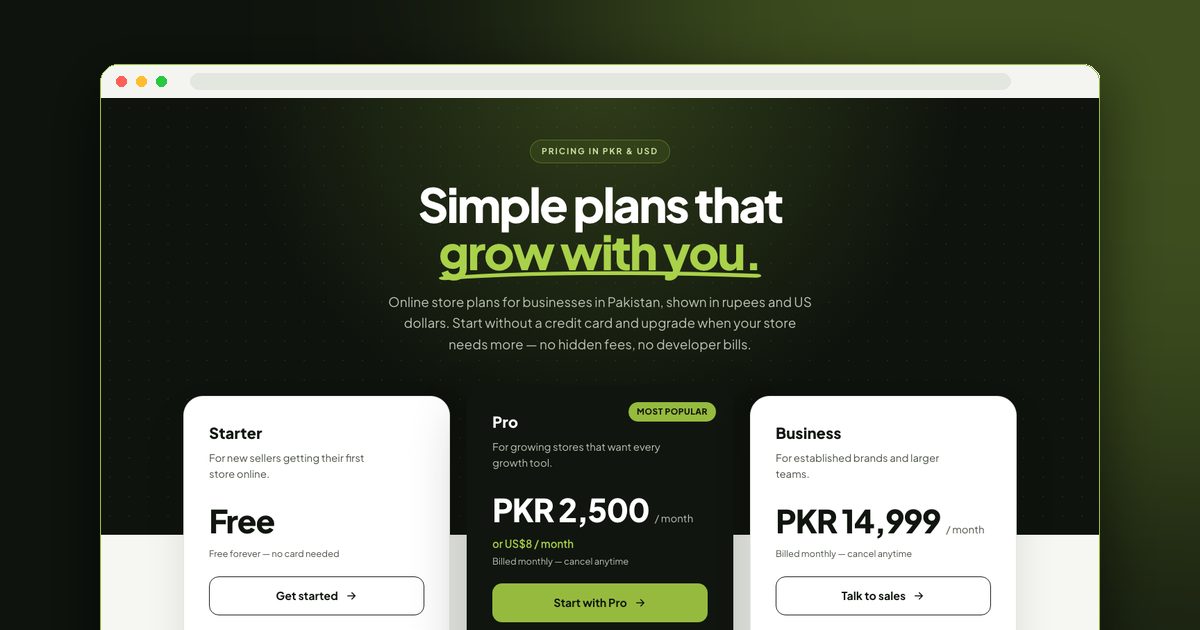
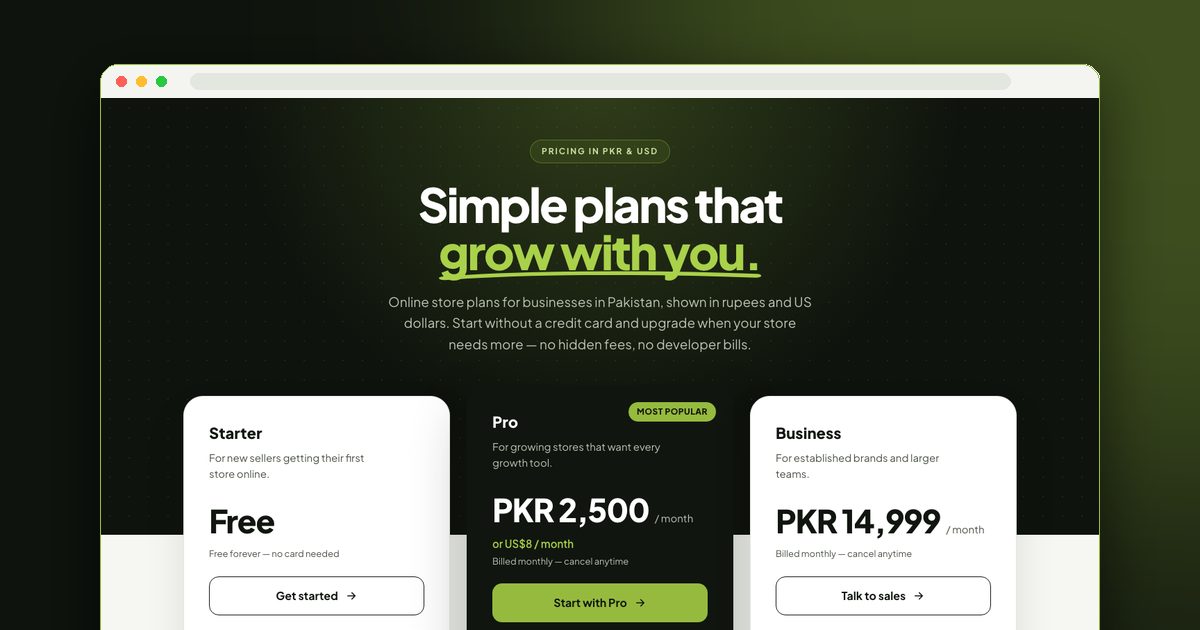
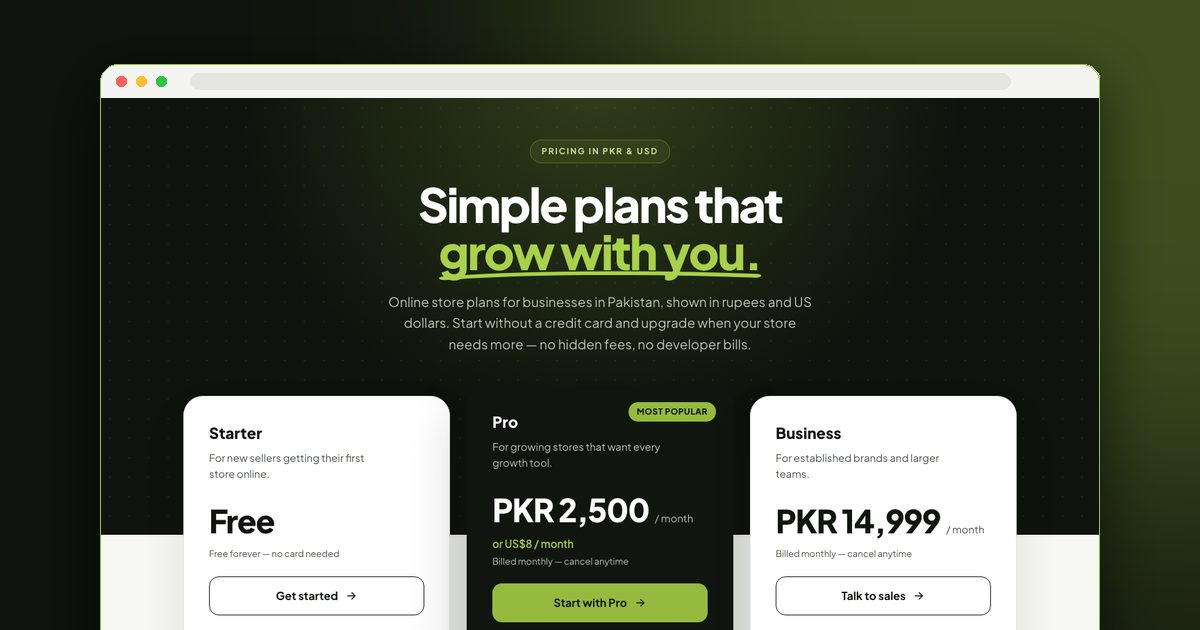
The cheapest way to build an online store, for anyone, is a genuinely free plan: Yuplify's Starter plan costs nothing, includes up to 30 products and a free yuplify.com address, and takes no transaction fee on your sales. Paid builders such as Shopify Basic and Wix Core list about US$29 a month on annual billing, and a store on Yuplify Pro is about US$8 (PKR 2,500) a month with unlimited products and your own domain. If you sell in Pakistan, the answer is the same plan with a local advantage: cash on delivery is built in on every plan, and you pay in rupees. The cheapest builder for you depends on your sales volume, so the rest of this guide compares total monthly cost, not just the headline subscription.
Disclosure: this guide is published by Yuplify, a free eCommerce website builder, so we are not a neutral party. Yuplify's own numbers come from our pricing page. Competitor figures were checked on 6 October 2026 and are listed in USD because that is how those companies bill; prices change often, so confirm on each vendor's own pricing page before you pay.
What Actually Drives the Cost of an Online Store
The monthly subscription is the number everyone compares, and it is rarely the number that decides what you pay. Five things make up the real cost:
A cheap subscription with a platform fee on every sale stops being cheap once you grow. A platform that takes 2% on a PKR 500,000 month of sales has taken PKR 10,000, which is four times the price of Yuplify Pro.
The Cheapest Builders Compared on Total Monthly Cost
The table below compares the entry plan that lets you sell online. It uses a simple example: a store selling the equivalent of US$1,000 in a month through an outside payment gateway. The last column shows what the platform charges you before your gateway's own fee, which every platform adds on top.
| Builder | Entry plan to sell online | Platform fee on sales | Platform cost at US$1,000 of sales | Free plan |
|---|---|---|---|---|
| Yuplify | Starter: PKR 0. Pro: PKR 2,500 (US$8) | None from Yuplify | PKR 0 on Starter, PKR 2,500 on Pro | Yes, 30 products |
| Shopify Basic | US$29 a month billed yearly, US$39 month to month | 2% extra when you use an outside gateway instead of Shopify Payments | About US$49 to US$59 | No permanent free plan |
| Wix Core | US$29 a month billed yearly | No platform fee reported on its e-commerce plans | About US$29 | No, selling needs a paid plan |
| WooCommerce | Plugin is free; hosting, theme and extensions are extra | None from WooCommerce itself | Depends on your hosting and extensions | Software only |
Competitor figures: Shopify and Wix prices as reported by pricing trackers on 6 October 2026. Check the vendors' own pricing pages for current numbers, because plan names, annual discounts and promotional pricing change. We left out figures we could not confirm for Square Online and Ecwid; both have free plans with limits and branding, so read their current terms before choosing.
Where Yuplify Costs Less, and Where It Does Not
Yuplify is cheapest in these situations:
It is not the cheapest choice if you already run a WordPress site and are comfortable maintaining it, because WooCommerce itself costs nothing to install. It is also not built for very large catalogs on the free plan, which caps at 30 products.
Yuplify Plans in Rupees
This is the full Yuplify price picture as published on the pricing page.
| Plan | Price per month | Products | Domain | Payments and couriers |
|---|---|---|---|---|
| Starter | Free | Up to 30 | Free yuplify.com address | Cash on delivery |
| Pro | PKR 2,500 (US$8) | Unlimited | Your own custom domain | Cash on delivery, Stripe card payments, TCS and Leopards courier booking |
| Business | PKR 14,999 | Unlimited | Your own custom domain | Everything in Pro, set up with our team |
Easypaisa is rolling out and is not yet something to count on. JazzCash is not supported. If a payment method matters to your customers, check the integrations page before you decide.
The Hidden Costs to Watch For
Free Builders: What You Really Get
Several platforms let you run a store at no monthly cost, each with trade-offs:
Free plans suit validation, very small catalogs and side projects. Check the product limit and whether you can connect a custom domain later without rebuilding. For the free-versus-paid decision in detail, read free vs paid e-commerce website builders.
A Worked Example: Three Stores, Three Budgets
Here is how the right choice changes with the size of the store. These are illustrations, not promises of results.
| Store | What it needs | Cheapest sensible setup |
|---|---|---|
| Home seller testing 15 products | A link to share on WhatsApp and Instagram, cash on delivery | Yuplify Starter at PKR 0 |
| Growing clothing brand with 200 products | Unlimited products, own domain, courier booking | Yuplify Pro at PKR 2,500 a month, plus a domain bought at cost |
| Developer-run store with custom needs | Full control of code and hosting | WooCommerce, with your own hosting budget |
The pattern is simple. Start where the limit does not hurt yet, and pay only when a specific limit starts costing you orders.
How to Keep Your Store Costs Low
How to Work Out Your Own Total Monthly Cost
The tables above use one example store. Your numbers will differ, so run this short calculation for every builder on your shortlist before you pay:
Repeat the calculation at double your expected sales. A platform that looks cheapest at 20 orders a month can look very different at 200, and the platform fee is the line that changes most as you grow.
Who Should Not Pick the Cheapest Option
The cheapest plan is not the right plan for everyone, and a lower sticker price can be the more expensive choice overall.
If a slightly more expensive builder removes platform fees, includes the features you would otherwise buy as apps and saves you hours every week, it is the cheaper option in the way that matters. For the full picture of build costs, read how much an e-commerce website costs, and for the step-by-step setup see how to make an e-commerce website without code. If you are still choosing between several options, the best e-commerce website builders compared maps the trade-offs.
Frequently Asked Questions
What is the cheapest ecommerce website builder in Pakistan? For a small store, Yuplify's free Starter plan, at PKR 0 a month with up to 30 products. Pro is PKR 2,500 a month when you need unlimited products and your own domain.
Is there really a free ecommerce website builder with no transaction fees? Yuplify charges no transaction fee on your sales on any plan. Your payment provider still charges its own fee, and cash on delivery orders have no gateway fee at all, only your courier's charges.
Can I start free and upgrade later? Yes. Start on Starter and move to Pro when the 30-product limit or the need for a custom domain starts costing you orders. You keep the same store.
Sabse sasta online store builder kaun sa hai? Chhote store ke liye Yuplify ka free Starter plan sabse sasta hai: PKR 0 mahana, 30 products tak, aur Yuplify aap ki sales par koi transaction fee nahi leta. Zyada products aur apna domain chahiye to Pro PKR 2,500 mahana hai.
Kya COD ke liye alag fee dena parti hai? Yuplify COD par koi fee nahi leta, ye har plan mein shamil hai. Sirf courier apni delivery charges leta hai.
More E-Commerce Website Builder Guides
Each guide in this series answers one question. Pick the one that matches where you are:
Final Thoughts
The cheapest e-commerce website builder is the one with the lowest total cost for your sales volume: subscription, platform fees, apps, domain and renewal combined. For most new Pakistani sellers that starts at a free plan, and moves to a flat PKR monthly fee only when growth forces the decision. You can try it with Yuplify's free e-commerce website builder, or see how the full platform works on the eCommerce website builder page.

Abu Bakar Memon
Founder & CEO
Abu Bakar Memon founded Yuplify in Karachi in 2023 — the free eCommerce website builder for small businesses in Pakistan. He writes about starting and growing an online store — pricing, cash on delivery, couriers and getting the first orders — from building the platform Pakistani sellers use every day.
Ready to Start Your E-Commerce Journey?
Create your online store in minutes with Yuplify. No coding required.
Get Started Free